Showing posts with label Tables in SAP and Relations. Show all posts

Saturday, 17 May 2014

Secondary index : Use - Advantages - Disadvantages.

What are secondary index and its advantages?

If none of the primary key is present in your select query where clause then we can think of secondary index otherwise the system searches through the entire table (full table scan) and the cost of such hit would be very high and would degrade the performance drastically.

You should only create secondary indexes, for database tables from which you mainly read, since indexes have to be updated each time the database table is changed.  Secondary indexes should contain columns that you use frequently in a selection, and that are as highly selective as possible to improve performance..

Keep the indexes as small as you can. The more fields the more inefficient they become. Try to keep it max with 4 fields.

Please note that whenever a table created a primary index automatically be created with the entire primary keys in it.

We can have maximum of 9 secondary index for a particular table.


How to use secondary index:
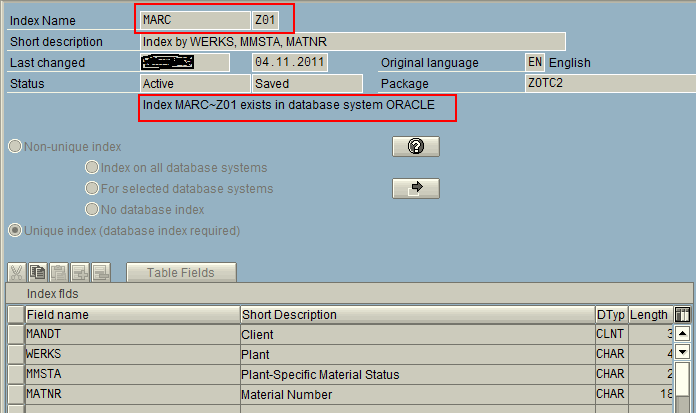

If there is any secondary index and you are using the particular fields in your where clause then the query should automatically take according to the secondary index.

In another instance, though the secondary index existed for the custom table, the Oracle Cost Based Optimizer (CBO) chose to ignore it and did a full table scan instead. This could be because the CBO found the cost of full table scan lower than the cost of using the secondary index. This was most likely caused by oracle profile settings which make full table scan more favorable. In such cases, in order to optimize performance we need to force the system to use the existing Secondary Index. This can be done by using Database Hints. Hints force the CBO to use the index defined in the query.

SELECT <fields> INTO <work area>
FROM <database table>
WHERE <logical expression> AND <logical expression>
%_HINTS <database name> 'INDEX("<database table>" "Index name")'.

Like:
%_HINTS ORACLE 'INDEX("MARC" "MARC~Z01")'.


What to Keep in Mind for Secondary Indexes:


Disadvantages of secondary index:

  • Every time you insert, update, modify or delete row it has to be updated. That means extra time at those moments. For highly maintained tables, this can be a real pain.

  • Lot of Secondary indexes will in turn introduce load on the select query to identify the most appropriate index which may slow down the performance.

  • Take additional DB space and time per update operation.

  • Might make matters more complex for the CBO (There are instances when the SAP Cost Based Optimizer (CBO) over-rides the secondary index and continues to do a sequential read on the table. At such times, coding an ABAP hint that would force the CBO to use the secondary index can be used).


Related document:

Thursday, 18 July 2013

INDX Table (Cluster Table): Characteristics, Usages and Advantages


INDX Table (Cluster Table):


Detail Link:


Characteristics:


  1. It’s a cluster table.

     Some other example of cluster tables:

     Like – RFBLG (BSEG, BSEC, BSED, BSES ans BSET.)

     Go to the table DD02L and enter the field Tabclass as TRANSP to get all transparent      tables, CLUSTER to get all cluster tables and POOL to get the pooled tables.


  1. The data stored (fields, structures, internal tables) are store in the CLUSTD in hexadecimal format (a compressed format).


  1. The length of a CLUSTD record is 2886. After reaching the length, there will be another line with increasing the SRTF2 value.SRTF2 value is start from 0.

Usage and Advantages:


  1. As it holds data in hexadecimal format, it compress the data. So there will be less consumption of memory.
  2. INDX table can hold data of any structure; structure independent. So using this feature we can store dynamic structured records in it. 
  3. It is useful when we need to keep a huge amount of data in ABAP memory, to improve the performance.

EXPORT the internal table or variable values into INDX and then  IMPORT from INDX will accelerate the performance, because it doesn’t consume ABAP session memory.


The INDX table is useful for huge amount of data to accelerate the performance.

Tuesday, 9 July 2013

Important Tables in SAP

Customer related tables with Important fields

KNA1: Customer Master-General(KUNNR,NAME1,LAND1)

KNB1: Customer Master(Company Code)(KUNNR,BUKRS,PERNR)

KNC1: Customer Master Data (Transaction Figures)(KUNNR,BUKRS,GJAHR)

KNVK: Customer Master Contact Partner(PARNR,KUNNR,NAME1)

KNVV: Customer Master sales data(KUNNR,VKORG,VTWEG,KDGRP)

KNBK: Customer Bank Details(KUNNR,BANKS,BANKL,BANKN)

KNVH: Customer Hierarchy (HITYP,KUNNR,VKORG,VTWEG,SPART)

KNVP: Customer Master Partner Functions(KUNNR,PARVW,KUNN2)

KNVS: Customer Shipment data(KUNNR,VSTEL,TRANS)

KNVI: Customer Tax data(KUNNR,ALAND,TATYP)


Vendor related

LFA1--Vendor Master-General (LIFNR,NAME1,ORT01)

LFB1--Vendor Master(Company Code)(LIFNR,BUKRS,PERNR)

LFC1--Vendor Master (Transaction Figures)(LIFNR,BUKRS,GJAHR)

LFM1—-Pur.Orgn. Related Vendor Data (LIFNR,EKORG)


Material Related

MARA--Material Master-General (MATNR,MTART,MATKL)

MARC--Material Master-Plant data(MATNR,WERKS,EKGRP)

MARD--Material Master- St.Location Data(MATNR,WERKS,LGORT,LABST)

MAKT--Material Descriptions(MATNR,MATKL,MAKTX)

MBEW--Material Valuation Data(MATNR,BWTAR)

MVKE—-Material Master: Sales related Data(MATNR,VKORG,VTWEG)


Plant related

T001W-- Plants (WERKS)

T001L-- Storage Locations (LGORT)


Sales related

VBAK: Sales Document(Header Data) (VBELN)

VBAP: Sales Document(Item Data) (VBELN,POSNR,MATNR,ARKTX,CHARG)

Enquiry, Quotation, Sales Order are differentiated based on Doc.

Type(VBTYP field) in VBAK,VBAP Tables( for Enquiry VBTYP = A,

for Quotation 'B' & for Order it is 'C'.)

LIKP: Delivery Table (Header Data)(VBELN,LFART,KUNNR,WADAT,INCO1)

LIPS: Delivery Table (Item Data)(VBELN,POSNR,WERKS,LGORT,MATNR,VGBEL)

(LIPS-VGBEL = VBAK-VBELN, LIPS-VGPOS = VBAP-POSNR)

VTTK: Shipment Table (Header Data)(TKNUM)

VTTP: Shipment Table (Item Data)( TKNUM,TPNUM,VBELN)

(VTTP-VBELN = LIKP-VBELN)

VTFA: Shipping Document Flow(TKNUM,VBELV,VBELN)

VTPA: Shipping Partners data(VBELN,PARVW,KUNNR,PERNR)

VTTS: Stages in Shipment(TKNUM,TSNUM,TSTYP)

VTSP: Transport Stage/Shipment Item Allocation(TKNUM,TSNUM,TPNUM)

VEKP: Handling Unit: Header(Packing)(VENUM,VSTEL)

VEPO: Handling Unit: Item (Packing)(VENUM,VEPOS,VBELN)

VBRK: Billing Table(Header Data)(VBELN,FKART,BELNR)

VBRP: Billing Table(Item Data)(VBELN,POSNR,FKIMG,NETWR,VGBEL,VGPOS)

(VBRP-AUBEL = VBAK-VBELN, VBRP-VGBEL = LIKP-VBELN)

Apart from these tables there are lot of other tables which starts with

‘V’, but we use the following tables frequently.

VBUK: All Sales Documents status & Admn. Data(Header)(VBELN,VBTYP)

VBTYP= ‘C’(Sales Order) VBTYP=’J’(Delivery) VBTYP=’M’(Invoice)

VBUP: Sales Documents status & Admn. Data(Item)(VBELN,POSNR)

VBEP: Sales Doc. Schedule Lines Data(VBELN,POSNR,EDATU,WMENG)

VBKD: To get sales related Business data like Payment terms etc.(VBELN,ZTERM)

VBFA: sales document flow data(VBELV,VBELN,POSNV,VBTYP)

VBPA: Partner functions Data(VBELN,PARVW,KUNNR,LIFNR)

VEDA: Contract Data(VBELN,VPOSN)

VEDAPO: Contract Data(VBELN,VPOSN)